Showing posts with label MDX. Show all posts

Friday, June 30, 2017

Move data "On-Save" from Planning BSO to Reporting ASO (Part 2)

This is continuation from previous post to provide more 'out of the box' solution for data movement from BSO planning to ASO Reporting cube. This solution is only possible if you are in 11.1.2.4. 

  We will have exactly the same process like part 1 of this blog. The only thing that we will be skipping here is writing CDF part. Because Oracle has calc manager CDF that can run a MaxL stored in the server using RUNJAVA com.hyperion.calcmgr.common.cdf.MaxLFunctions. More over from 11.1.2.4 we can have formatted MDX output in a flat file. What else you need ! You already guessed where it is going...

Solution:

  1. Level0 export MDX query with 'NONEMPTYBLOCK‘  keyword. 
  2. Create MaxL script to spool MDX value to a flat file. Use set column_separator "|" ; to get a formatted output. More information on this available on other very useful blogs.
  3. Load the flat file to ASO cube with MaxL. 
  4. Call all of these MaxL scripts from BSO calculation script using RUNJAVA com.hyperion.calcmgr.common.cdf.MaxLFunctions. (Check internet blogs)
  5. Add this calculation script in your web-form to run it on save.

Wednesday, March 2, 2016

OBIEE: Generate Level 0 members dynamically for an Essbase upper level member


Occasionally you might have come across a requirement where you needed all the list of level zero members under a selected member. Specially it is helpful when you need to create a detailed transaction report for an upper level entity or cost center. For example, If you can generate level 0 members under certain roll up , you would be able to use it against your transaction table. The solution can be achieved different ways. Let us discuss few of them. 


SQL Solution: "Start With connect by" With function Connect_by_isleaf


If your hierarchical back-end data is flatten , then your task is much easier. Just join it with transaction table or fact table to get the details. But if your metadata is in a table in parent child format then you need to use Oracle  "start with connect by" to get your level 0 data. The query could look like this:

Select Member_name
  From (    Select Member_name, Connect_by_isleaf Is_leaf
              From Period_dimension
        Start With Member_name = :Member_name
        Connect By Prior Member_name = Parent)
 Where Is_leaf = 1

Clearly, for this to work you need to have your database table in sync with Essbase hierarchy. Which always may not be the case.


OBIEE Solution:


In OBIEE, one can actually connect to Essbase to get the metadata information and then pass it to relational database  with the help of OBIEE feature "is beased on another Analysis"


Here in the screenshot EntityLev0 is an analysis that uses presentation layer variable. That variable will pass our upper level member to EntityLev0 analysis and will produce all level 0 members below it. 

Now how to generate such report ? 

Solution 1: Generating Level 0 members in OBIEE dynamically with MDX and 'Evaluate' Function. 


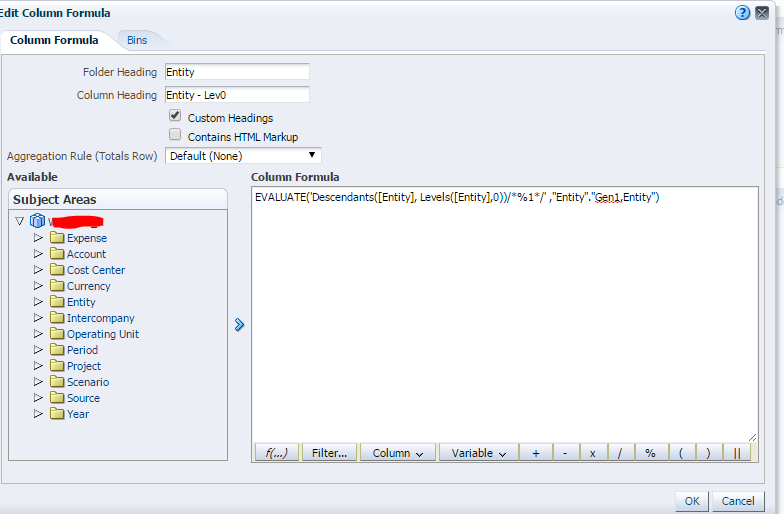
The following will generate all the level 0 members of Entity dimension. Notice how you can manipulate Evaluate function by commenting out parameter requirement. 

Now you can easily make it parameterized by using a presentation layer variable. like 

EVALUATE('Descendants([@{PV_Entity}], Levels([Entity],0))/*%1*/' ,"Entity"."Gen1,Entity")

But there is a problem. This will give you member alias not member name in our current set up.

Unless you set your cube to display member_name like below.


Is there a way to get member name not alias when display column is set to display Alias? Most likely not with Evaluate. Mainly because member name is an intrinsic property of a member. Evaluate works with MDX functions and there is no mdx function available to get the member property. I will be happy to be proved otherwise. 

So, if you need list of level 0 member name , next one is the solution that you are looking at....

Solution 2: Dynamically get list of level 0 members for any higher level member with MEMBER_UNIQUE_NAME

 Step 1) Update RPD to get a flatten OBIEE column with essbase member name (not default alias)

I have wrote about this in my last blog. Read it here

Step 2) Create an analysis which would look like this: 


* "Period" above is the flatten member name available for all members. 
** {YearTotal} is default value. I normally put my generation 2 member as default. It helps to test the report. If you don't put a default value it fails in the result section of the analysis but works fine in dashboard. 


Clearly column 1 above will provide you level 0 members always based on what you have in your presentation variable. 

So, Finally use it in your transaction details report .....


Tuesday, March 1, 2016

OBIEE - How to get OBIEE column with Essbase member name (not default alias) for all generations?

In physical layer of OBIEE RPD, one can create column for Alias table.  It also gives you the ability to create OBIEE presentation layer column with Essbase member name. One can achieve that by choosing "Create column for Alias Table"  and then selecting "Member_Name" in the selection box.


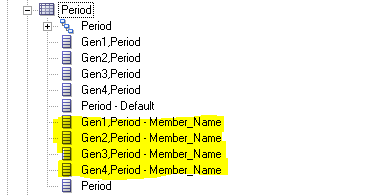
But that will create only columns which are hierarchical in nature. Like one highlighted below...


But what about a getting a OBIEE flatten column(i.e. column representing all members for all generations) with Essbase member name ? 

When a cube is dragged in business layer and subsequently in presentation layer, it automatically creates a flatten member. like Period-Default above. This is generated in OBIEE "out of the box". But it is based on default alias name not member name. It is very useful candidate where you need to filter dynamically without knowing the generation value of a member. Here is the steps to create similar column with member_name. 

1. Right click on dimension in Physical layer and choose Properties.


2. click the + sign in the next window.


3. Give it a name. In my case I had it as my dimension name "Period". Then put the External name as "MEMBER_UNIQUE_NAME" and Column Type as Member Key. 


4. Drag entire cube from physical layer to business Layer and then to presentation layer. 
Voila ....

here is how it looks in analysis .....


It is interesting to observe the MDX generated for this ....


Message
-------------------- Sending query to database named  XXXX (id: <<109974738>>), connection pool named XXXX-ConnectionPool, logical request hash f18f770b, physical request hash f2454ebe: 
Supplemental Detail
With
  set [_Period0]  as '[Period].members'

select
  {} on columns,
  {{[_Period0]}} properties MEMBER_NAME, GEN_NUMBER, [Period].[MEMBER_UNIQUE_NAME], [Period].[Default] on rows
from [Cube.Database]


Tuesday, August 25, 2015

How to extract fast from BSO Planning to ASO Reporting

Recently we have implemented a new BSO planning cube (for input purpose) and corresponding ASO cube for reporting. We have a process that Extract from BSO cube and load data to ASO cube. We are running this process every 15 min interval to sync our reporting cube with planning cube.
Well, I will not discuss here the merit of using BSO planning with ASO Reporting. But here in this blog, I would like to discuss certain way by which you can extract large chunk of data fairly quickly from BSO. Then you can load that data to ASO cube or do nothing and be happy that you did it and did it fast!
This process is much quicker than dataexport calc script extract (as per testing done in our environment). The process here is based on MDX extract to flat file from BSO with Java API. The same flat file can be loaded to ASO/BSO cube if needed. Key to your MDX query success? Keyword 'NONEMPTYBLOCK' in the query. It is complex to parse MDX output because of its weird format. But once you do that ‘Good thing will happen’...

Here is the code sample that we have used in our job that runs every 15 min to extract from BSO to ASO cube.


//Note1: Provide full path to your app/DB folder of target database as the value of filePath below. In case you are loading the extracted data back to ASO/BSO cube.

// Note2: We will extract data from BSO in flat file fileName

//Note3: Extracted data will be written in a format that do not require any load rule to load back into ASO or BSO. That is each row will have one dimension member from each dimension and a measure value. We will not load 0's or #Missing.

//Sample:

pln= IEssbase.Home.create(IEssbase.JAPI_VERSION);
// Sign On to the Provider
IEssDomain plnprovider = pln.signOn(s_userName, s_password, false, null, s_provider);
try {
cv = plnprovider.openCubeView("Mdx Query Extract", s_PlanningSrvName,s_plnAppName, s_plnCubeName);
System.out.println(new Timestamp(System.currentTimeMillis()) + " Connected to "+ s_PlanningSrvName +" "+
                                 s_plnAppName +" "+ s_plnCubeName);
mdxExtract(cv); // This subroutine will extract data from planning cube to flat file
               
} catch (Exception x) {
                System.out.println("Error: Extract to flatfile failed " + x.getMessage());
                x.printStackTrace();
                statusCode = FAILURE_CODE;
} finally {
                // Close cube view.
                 try {
                    if (cv != null)
                        cv.close();
                   } catch (EssException x) {
                    System.err.println("Error: " + x.getMessage());
                    x.printStackTrace();
                    statusCode = FAILURE_CODE;
                   }
}


//========================================================
// Subroutine mdxExtract
//========================================================

        private static void mdxExtract(IEssCubeView cv) throws Exception {
        boolean bDataLess = false;
        boolean bNeedCellAttributes = false;
        boolean bHideData = true;
       // String lastData = null;
        String mdxquery = null; 
        file=new FileWriter (filePath+fileName); 
        filePrint=new PrintWriter(file);
        System.out.println("Beginning MDX Extarct and Load...");
       

        mdxquery ="SELECT " +
                    " {MemberRange([Period].Jan,[Period].Dec)}" +" ON COLUMNS," +
                    " NONEMPTYBLOCK Crossjoin"+
                    " (Crossjoin ([Account].Levels(0).Members, [Operating Unit].Levels(0).Members),"+
                    "   (CrossJoin "+
                    "           (Crossjoin ([Scenario].Levels(0).Members,[Entity].Levels(0).Members),"+
                "                       (CrossJoin "+
                "                               (CrossJoin ({USD,CAD},[Version].Levels(0).Members),"+
                "                                       (CrossJoin "+
                "                           ( CrossJoin([Product].Levels(0).Members, [Intercompany].Levels(0).Members), "+
                "                                                               CrossJoin([Source].Levels(0).Members, [Year].Levels(0).Members)   ) ))))))"+
                " ON ROWS "+
                        " FROM [APP].[DB]";
        System.out.println(mdxquery);
        IEssOpMdxQuery op = cv.createIEssOpMdxQuery();

        op.setQuery(bDataLess, bHideData, mdxquery, bNeedCellAttributes,IEssOpMdxQuery.EEssMemberIdentifierType.NAME);
        op.setXMLAMode(false);

        op.setNeedFormattedCellValue(true);
        op.setNeedFormatString(false);
        op.setNeedMeaninglessCells(false);

        cv.performOperation(op);
        System.out.println("MDX Extarct complete...Writing in file ");
        IEssMdDataSet mddata = cv.getMdDataSet();
        IEssMdAxis[] axis = mddata.getAllAxes();

        String s_pad="Amount"; // We have one more dimension in ASO cube than BSO. We are padding a value here for the member name where data needs to get loaded. 
        int totalRec=0;
        int k=0;
    
       for(int j=0;j<axis[1].getTupleCount();j++)
        for(int i=0;i<axis[0].getTupleCount();i++){
         data=null;
         IEssMdMember[] row = axis[1].getAllTupleMembers(j);
         IEssMdMember[] datacol = axis[0].getAllTupleMembers(i);
         data="\""+row[0].getName()+"\" \""+row[1].getName()+"\" \""+row[2].getName()+"\"     \""+row[3].getName()+"\" \"";
         data=data+row[4].getName()+"\" \""+row[5].getName()+"\" \""+row[6].getName()+"\" \""+s_pad+"\" \"";
         data=data+row[7].getName()+"\" \""+row[8].getName()+"\" \""+row[9].getName()+"\" \""+datacol[0].getName();

          loadCellValue(mddata,k);
                
          k++;
        if(data!=null){
                filePrint.println(data);
                totalRec++;
           }
        }//end of for loop
       
       
        filePrint.close();
        System.out.println(new Timestamp(System.currentTimeMillis()) +" Data Export file is ready... ");
        System.out.println("Total number of Data Extracted:"+k);
        System.out.println("Total number of Data Loaded:"+totalRec);
        System.out.println("------------------ ------------------------- ----------------");
    }

    private static void loadCellValue(IEssMdDataSet mddata ,int k)
            throws Exception {
       
       
                if (mddata.isMissingCell(k)) {
                        data=null;
                } else {
                    String fmtdCellTxtVal = mddata.getFormattedValue(k);
                    if (fmtdCellTxtVal != null && fmtdCellTxtVal.length() > 0) {
                        data=null;
                    } else {
                        double val = mddata.getCellValue(k);
                        data=data+"\" "+val;
                    }
                }
       
                k++;
            }
   

//========================================================
// Load ASO
//========================================================

// Easy 

String[][] error=cube.loadData(IEssOlapFileObject.TYPE_TEXT, null, IEssOlapFileObject.TYPE_TEXT,s_exportedFileName , true, null,null);
if (error!=null){
 System.out.println("There is kickout ....Check for it");
// print it in File if needed
}