Showing posts with label DATAEXPORT CALC. Show all posts

Friday, June 30, 2017

Move data "On-Save" from Planning BSO to Reporting ASO (Part 1)

Moving data from BSO planning application to ASO reporting application ? 
Want to have this data movement really fast ? 
Want to move that data as soon as users save web forms ? 
     
      Well, you can do that in many different ways. The time it takes to move the data between 2 cubes depends mostly on how fast you can extract level 0 data from the Planning BSO cube. 

    To do that I have used MDX export from planning BSO cube with 'NONEMPTYBLOCK‘ keyword. I have tested this against 3 different BSO planning cubes and found that MDX with 'NONEMPTYBLOCK' keyword export level 0 data faster than data export calculation script. But I imagine, it won't be the case always. So, test test and test before you select your data export process. 

We have built this solution last year using Essbase Java API and CDF. I agree this is not really out of the box solution. You need to use bit of Essbase Java API to format MDX output to get this to work.  But if you are in Essbase version 11.1.2.4, this can be a solution where you don't have to write any Java code. I will write about that in my next post.


Here is the solution steps:


  1. Get your level0 export MDX query ready. Don't forget to   add 'NONEMPTYBLOCK‘  keyword. 
  2. Now you have to create Java Custom defined function(CDF). With in the CDF use Essbase Java API to parse and load MDX output to ASO database. If you need more details, I have blogged earlier about this here
  3. Run CDF from a calculation script in the planning cube using RUNJAVA command.
  4. Add this calculation script in your web-form to run it on save.
  5. Success of this 'On-Save' load depends on speed. You don't want your user to watch their frozen web-form for 5 min while data is getting transferred. Try to have this data movement more targeted by passing POV information to your CDF from planning web-form via calculation script. By doing that you can minimize amount of data movement and restrict it only to POV of the web-form. 


 Demo time ... 


Thursday, November 3, 2016

Truncating DATAEXPORT target relational table with CDF

First of all, I am a big fan of Essbase DATAEXPORT calc script to relational database. It provides flexible way of communication between cubes. You can export data to a relational table then manipulate through SQL load rule and load it back.  Certain type of mapping / data management is much easier in SQL. Moreover entire script can be called from Maxl. 
    Well, can it be? One problem though, Essbase DATAEXPORT calc does not allow you to truncate / delete from the underline table. Bummer!! How hard it could be for oracle to provide that function? It would have save my time of writing this blog and yours reading it. 
We will solve this issue with CDF (custom defined function). If you have not created your first CDF yet, then this is a good place to start. Once you have that CDF ready you can use it in your calc script like this…

Steps to install CDF

  1. Install JDK. In my case I have JDK 1.7 
  2. Install Eclipse (Java IDE). 
  3. In Eclipse create a new Java project. (File->New->Java Project). I have named it CDF.
  4. Expand the project and right click on src folder, create new -> package. I named it  com.williams.cdf
  5. Right click on com.williams.cdf and select Build path -> Configure Build Path. Click on the Libraries tab then add 2 External JARs essbase.jar and odbc14.jar. File essbase.jar is available in Oracle/Middleware/EPMSystem11R1/products/Essbase/EssbaseServer/java directory. you can download odbc14.jar from internet. It is required to connect to your underline oracle database. If your relational database is not oracle then you need corresponding java jar file to connect with that database.
Now the set up is done,  it is time for coding.
 6. Right click on package com.williams.cdf and create new -> Class.  I named it relationalDDL. Once done, it should look like this...
Here is the code that I have for relationalDDL.java ...

package com.williams.cdf;
  
import java.sql.*;
import oracle.jdbc.pool.OracleDataSource;

public class relationalDDL {
    static Connection sqlcon=null;
    static Statement sqlstmt = null;
    static OracleDataSource ods = null;
  public static void main(com.hyperion.essbase.calculator.Context ctx,String args[]) {         
         truncateTable(args[0],args[1],args[2],args[3]); 
    }

   private static void openConnection( String URL, String userid, String passwd) {
                    try {
                                                ods = new OracleDataSource();
                                } catch (SQLException e1) {
                                                System.out.println("New Connection Object creation Failed: " + e1.getMessage());
                                }
                ods.setURL(URL);
                ods.setUser(userid);
                ods.setPassword(passwd);
                                try {
                                                sqlcon = ods.getConnection();
                                                System.out.println("Oracle database connection established to "+ URL);
                                } catch (SQLException e) {
                                                System.out.println("Connection Failed to "+ URL);
                                                System.out.println("SQLException: " + e.getMessage());
                                }              
           
    }
    private static void closeConnection(Connection oraConn){
                if(oraConn != null)
                                {
                                                try
                                                {
                                                                oraConn.close();
                                                }
                                                catch (SQLException x)
                                                {
                                                                System.out.println("SQLException: " + x.getMessage());
                                                }
                                }
    }
    public static void truncateTable(String table, String URL, String userid, String passwd) {
     
                System.out.println("CDF Started");
                openConnection( URL,userid, passwd);
                try {
                                                sqlstmt=sqlcon.createStatement();
                                                sqlstmt.execute("TRUNCATE TABLE "+ table);
                                                System.out.println("Trancated table: "+table);
                                } catch (SQLException e) {
                                                System.out.println("SQLException: " + e.getMessage());
                                }
                closeConnection(sqlcon);
    }
}

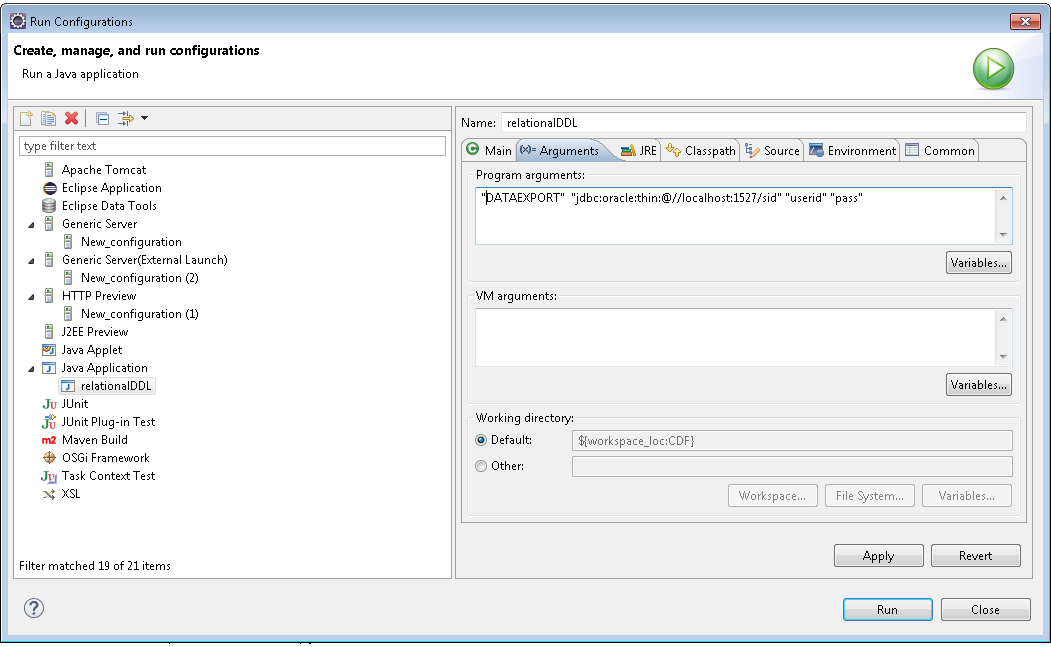
If you have everything set up properly then you should be able to save the code above without any error in eclipse. Once saved right click on relationalDDL.java in package explorer to create a run configuration. 


We will configure something like shown below but we will not run it. Just hit apply and close.


Once configuration is saved, right click on relationalDDL.java in package explorer and click Export. Select Runnable JAR file


Provide the path where you want to export in your local machine. Ignore any warning that says main class not found. I named the jar file as DDL.jar. 

copy this jar file to your EPMSystem11R1/products/Essbase/EssbaseServer/java/udf folder.

update udf.policy file in EPMSystem11R1/products/Essbase/EssbaseServer/java
add following lines.

// Grant all permissions to CDF DDL.jar 
grant codeBase "file:${essbase.java.home}/udf/DDL.jar" {
 permission java.security.AllPermission; 
};

Now as this CDF is ready to  run, invoke it from calc script with RUNJAVA command. For any error check Essbase.log.